From Field to Model: Capturing High-Quality 3D Gaussian Splats with UAV Imagery
In this article, we'll break down the complete workflow—from flight strategy to software configuration—showing you how to leverage MipMap to generate crisp, high-quality Gaussian Splats from your drone data.
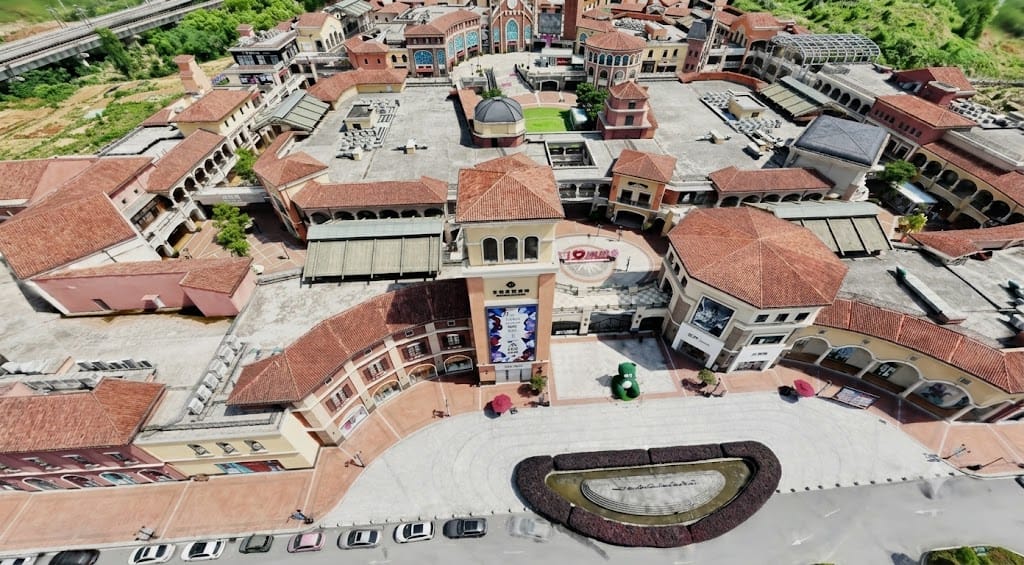
Whether it's for asset inspection, digital twins, or large-scale urban mapping, 3D Gaussian Splatting (3DGS) has rapidly become a go-to technology in the reality capture space, praised for its hyper-realistic rendering and seamless visualization. For engineering projects that demand high-fidelity, high-precision reconstructions of intricate environments, Gaussian Splatting delivers an unparalleled level of visual texture and detail.
However, in production environments, we often run into frustrating bottlenecks like blurry edges, vertical holes in geometry, or sluggish performance when handling large datasets. Resolving these issues comes down to one fundamental principle: while the algorithms do the heavy lifting during processing, the ultimate quality of your Gaussian Splat depends entirely on your initial capture strategy.
In this article, we'll break down the complete workflow—from flight strategy to software configuration—showing you how to leverage MipMap to generate crisp, high-quality Gaussian Splats from your drone data.
UAV Data Acquisition: The Foundation of High-Fidelity Models
Compared to traditional photogrammetry, Gaussian Splatting algorithms are significantly more demanding when it comes to image overlap and multi-view redundancy.
Viewpoint Coverage and Overlap Requirements
Gaussian Splatting relies on capturing the same spatial point from a wide array of perspectives. If your capture angles are too limited, the model will suffer from visual artifacts or geometry breakdown when viewed from certain positions.
- High Overlap Thresholds: When planning your drone flight paths, we recommend setting a minimum of 80% frontal (front-to-back) overlap and 70% side-to-side overlap.
- The Importance of Oblique Imagery: Relying solely on nadir (straight-down) imagery will limit your model; it will look great looking directly down, but will fall apart when viewed from a side angle. To properly capture vertical surfaces like building facades, under-eaves, and tower structures, you must collect oblique imagery by orbiting the target area from multiple altitudes and distances.
Ground Sample Distance (GSD) Control
To accurately capture fine geometric details—such as piping, vegetation, window frames, and industrial infrastructure—maintaining strict control over your Ground Sample Distance (GSD) is essential.
Recommendation: For industrial sites or dense urban environments, we recommend a GSD of ≤ 3 cm. By properly managing your flight altitude and camera resolution, you ensure that the raw pixels provide enough spatial detail for the reconstruction engine.
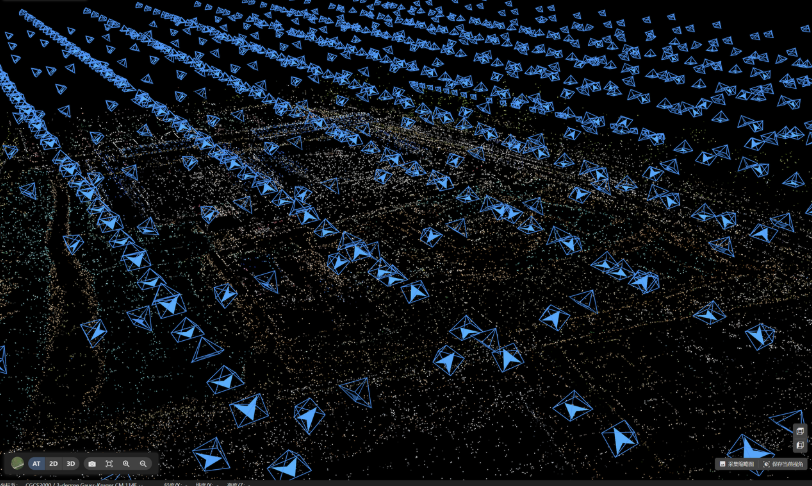
Drone Flight Guides for Typical Scenarios
Different asset geometries require distinct flight planning. Field teams need to adapt their flight paths flexibly to achieve maximum image redundancy without wasting battery or flight time.
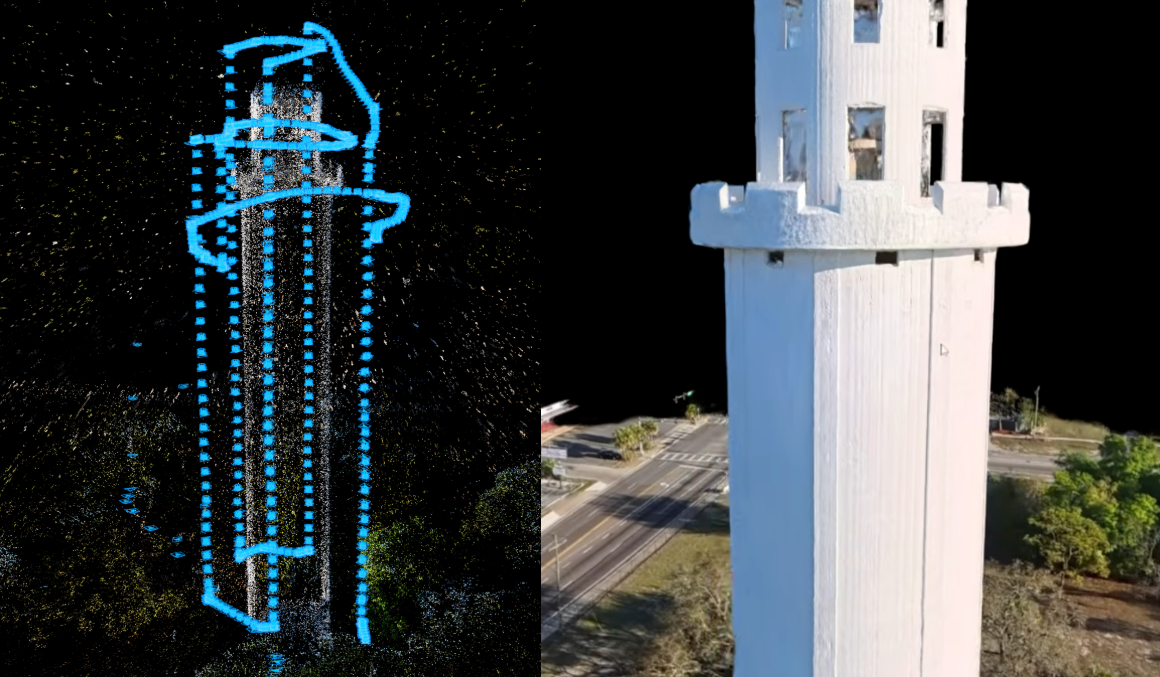
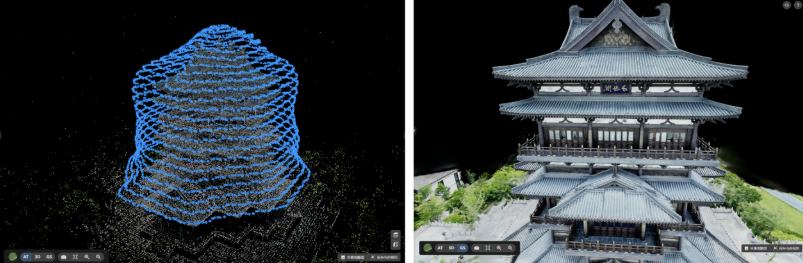
Isolated Tall Structures (e.g., Communication Towers, Chimneys, ATC Towers)
These structures feature high verticality and relatively small cross-sections, making it incredibly easy to miss structural details using standard grid flights.
Flight Pattern: Multi-tier, variable-radius orbital flights.
Flight Strategy: Fly the drone in circular orbits around the asset at multiple altitude tiers, varying the radius from close-up to further back. Ensure your overlap remains at 80% or higher. For a truly watertight data wrap, supplement these orbits with top-down (nadir) shots from the outer ring, and—where safety permits—low-altitude upward-looking (oblique) angles.
Large-Scale Areas (e.g., Industrial Plants, Municipal Districts)
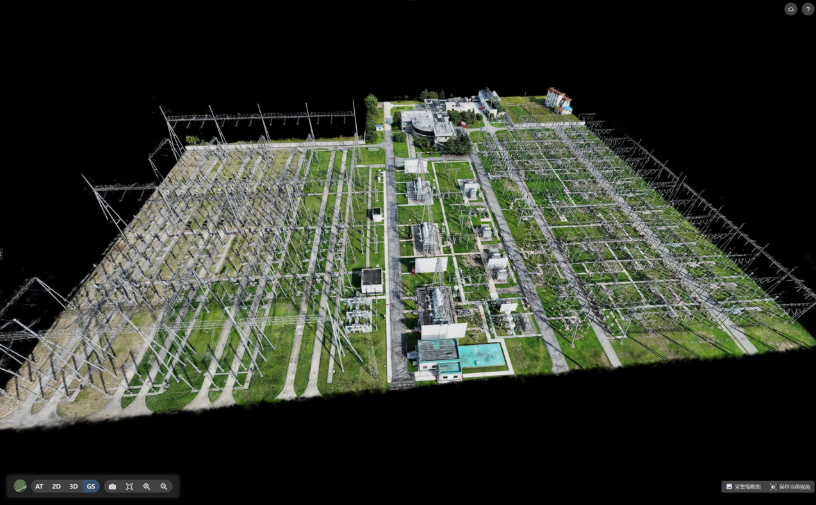
For expansive urban footprints or complex industrial complexes, the priority shifts to balancing global coverage with localized precision.
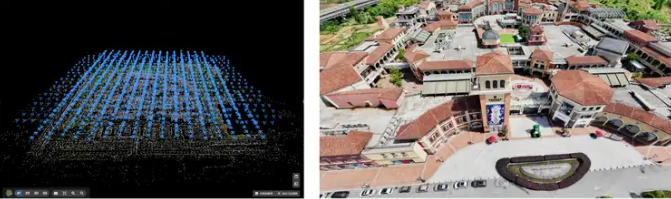
- Flight Pattern: Crosshatch oblique grids combined with targeted orbital fill-shots.
- Flight Strategy: Maintain 80% frontal and 70% side overlap while keeping the altitude capped at GSD $$\l$$ 3 cm. For areas with dense vegetation, sharp terrain variations, or highly complex standalone architecture, supplement the automated grid with manual, multi-angle orbital fill-shots to patch any gaps in the global dataset.
Hardware & System Requirements
Gaussian Splatting is a highly hardware-intensive process, placing heavy demands on both GPU compute power and dedicated VRAM.
Recommended Hardware Configuration
To process Gaussian Splatting datasets smoothly in MipMap, your system should meet or exceed the following hardware baselines:
Component | Minimum Baseline | Recommended |
GPU | NVIDIA GPU (Compute Capability 7.5+, e.g., RTX 3080) | NVIDIA RTX 4080 or higher |
VRAM | 8 GB or more | 12 GB or more |
Quick Tip for Performance Optimization
Because Gaussian Splatting training heavily taxes your graphics card, it is best to close other GPU-intensive applications (such as 3D rendering software or heavy games) before starting the process in MipMap. This ensures that your VRAM and CUDA cores are fully dedicated to the MipMap training pipeline, maximizing processing speed and preventing out-of-memory (OOM) crashes.
MipMap Workflow & Core Technical Advantages
An efficient algorithm is key to unlocking the full value of your fieldwork. When it comes to data fusion and large-scale rendering for 3D Gaussian Splatting, MipMap delivers several key technical advantages:
Seamless Support for Heterogeneous Data
MipMap supports not only standard JPEG/PNG imagery from drones, panoramic cameras, and smartphones, but also LiDAR-captured LAS point clouds. The software automatically parses UAV spatial positioning data and groups multi-focal lenses for optimal bundle adjustment, drastically lowering the barrier to entry for multi-source data processing.
Tiled Training & Advanced Optimization
To combat common 3DGS issues like fuzzy boundaries and airborne "floaters" (artifacts), MipMap features an optimized training engine that produces crisp, clean, and structurally sound splats. By leveraging an automated tiling mechanism, the software distributes the computational load effectively, ensuring system stability even when processing massive datasets.
LOD-Driven Massive Scene Rendering
Loading millions of Gaussian primitives can easily cause severe rendering lag on client devices. MipMap implements a custom Level of Detail (LOD) architecture for Gaussian Splatting, enabling smooth, stutter-free rendering and seamless zooming across massive, real-world scenes.
Open Data Formats & Streamlined Delivery
The platform supports exporting to industry-standard ply formats, as well as sog and sog-tiles formats optimized for web streaming. This allows users to easily integrate with third-party platforms or upload to the cloud with a single click, simplifying client delivery and collaboration.
Troubleshooting Guide
If you encounter anomalies or suboptimal results during your Gaussian Splatting projects, use the following matrix to identify and resolve common issues:
Issue | Potential Cause | Fix |
Large gaps or holes in the model | Missing oblique imagery or insufficient overlap. | Supplement the dataset with orbital or side-angle fill-shots. |
Blurry edges or ghosting artifacts | Motion blur during flight or incorrect camera focus. | Increase shutter speed (or reduce flight speed); lock focus using manual mode. |
Insufficient VRAM or CPU data bottlenecks. | Downscale the input resolution, reduce the training batch size, or upgrade your GPU. | |
Massive scenes failing to load | Insufficient local system memory (RAM/VRAM). | Leverage MipMap's automated tiling and LOD features for smooth handling. |
3D Gaussian Splatting truly bridges the gap between high-fidelity visuals and scalable performance. While MipMap's robust reconstruction engine provides a solid algorithmic backbone for automated training and fluid visualization, structured, high-density UAV data acquisition remains the bedrock of any successful asset model. By understanding the logic of multi-view coverage and implementing smart flight strategies, you can efficiently generate highly precise, seamless reality capture deliverables.
If you have an upcoming project in reality capture, asset inspection, or site digitization, consider downloading a trial and importing a set of drone data to experience the 3D Gaussian Splatting workflow first-hand in MipMap Desktop.
Try for yourself 👉https://na.mipmap3d.com/download/desktop